

 Laptops
 Phones & tablets
 Desktops
 Computer Parts
 Accessories
A seller saying “the battery lasts 5 hours” doesn’t tell you the full story. Here’s what to check before paying for a used laptop.
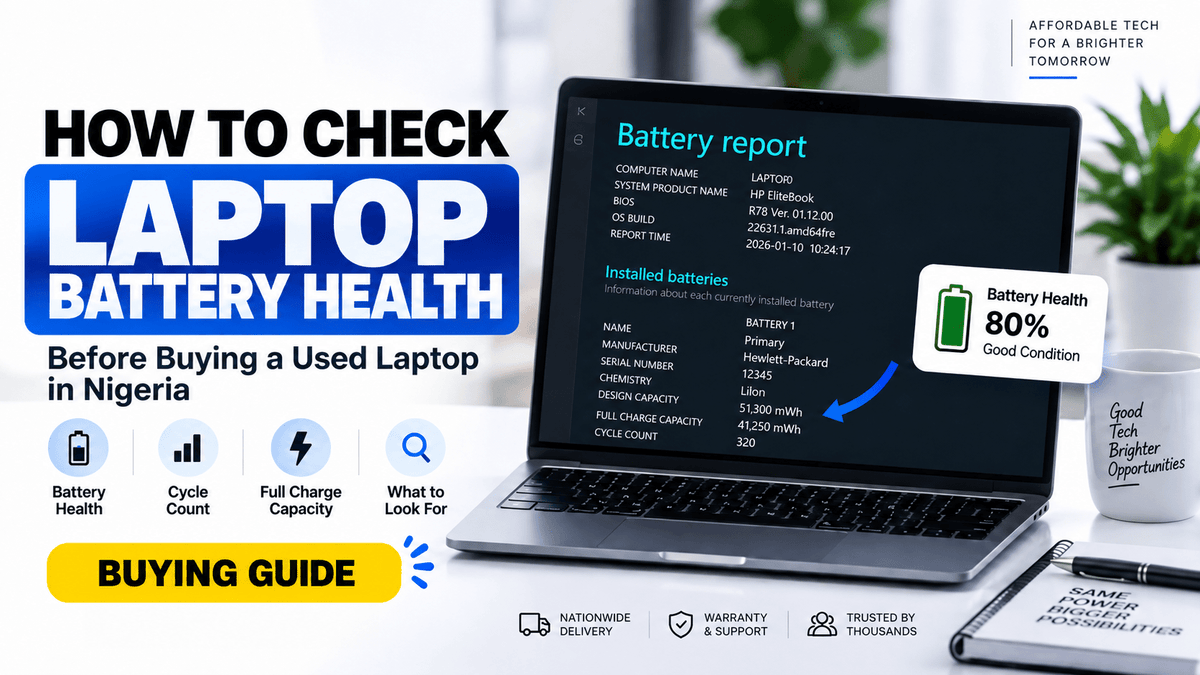
How to Check Laptop Battery Health Before Buying a Used Laptop in Nigeria
You’re about to buy a used laptop.
You ask the seller:
“How long does the battery last?”
The answer comes back:
“About 5 hours.”
Sounds good, right?
Not necessarily.
Battery runtime alone is one of the easiest laptop specifications to misunderstand because how long a laptop lasts on battery depends heavily on how it is being used.
A laptop might last several hours while typing a document at low brightness, but drains much faster while making video calls, streaming, editing videos, running many browser tabs, or using the screen at maximum brightness.
So when buying a used laptop, don't ask only:
“How many hours does the battery last?”
A better question is:
“What is the battery health?”
In this guide, we'll explain what laptop battery health means, how to check it in Windows, what cycle count means, what figures you should pay attention to, and what warning signs to look for before buying a pre-owned laptop.
Battery Life and Battery Health Are Not the Same Thing
These two terms are often used as though they mean the same thing.
They don't.
Battery life
Battery life generally refers to how long the laptop can run after being disconnected from the charger.
For example:
“This laptop lasts approximately 4 hours on a full charge.”
That tells you something about runtime, but the number can change dramatically depending on usage.
Battery health
Battery health indicates how much charging capacity the battery retains compared with when it was new.
Laptop batteries naturally lose capacity as they age and go through charge cycles.
Microsoft notes that lithium-ion batteries gradually lose capacity over time and that severely deteriorated batteries may eventually provide very short runtime.
That is why battery health can be a much more useful figure when evaluating a used laptop.
Why “5 Hours Battery” Doesn't Tell You Enough
Let's imagine two people using exactly the same laptop.
The first person:
- Reduces screen brightness
- Uses Microsoft Word
- Keeps only a few browser tabs open
- Turns Bluetooth off
- Doesn't make video calls
The second person:
- Uses maximum brightness
- Has Chrome with 20 tabs open
- Watches YouTube
- Uses Zoom
- Runs Photoshop in the background
They are unlikely to get the same battery runtime.
So when you see a laptop advertised as:
“Battery lasts 4–5 hours”
don't interpret that as a guaranteed number.
The actual runtime depends on the workload, screen brightness, battery condition, processor, display, power settings, and even background applications.
5 Battery Terms You Should Understand Before Buying a Used Laptop
1. Design Capacity
Design Capacity is approximately the amount of energy the battery was designed to hold when new.
For example:
Design Capacity: 50,000 mWh
Think of this as the original size of the battery's “tank.”
2. Full Charge Capacity
Full Charge Capacity shows approximately how much energy the battery can currently hold when fully charged.
Imagine the same battery now shows:
Full Charge Capacity: 40,000 mWh
It was designed for 50,000 mWh but currently holds around 40,000 mWh.
That gives you a much better idea of how much of its original capacity remains.
3. Battery Health
One useful way of estimating remaining capacity is:
Full Charge Capacity ÷ Design Capacity × 100
Using our example:
50,000 mWh design capacity
40,000 mWh current full-charge capacity
The battery retains roughly 80% of its original capacity.
This is a useful comparison, although manufacturers may calculate and report battery condition somewhat differently.
4. Cycle Count
A battery cycle roughly represents the equivalent of using 100% of the battery's capacity.
That does not necessarily mean you charged the laptop from 0% to 100% once.
For example, using 50% today and another 50% later can collectively make up approximately one full cycle.
Higher cycle counts generally indicate that the battery has seen more use, but cycle count should not be considered alone.
A lower-cycle battery can still have problems because of age, heat, or poor storage conditions.
5. Battery Runtime
This is the number most buyers focus on:
2 hours.
4 hours.
6 hours.
It matters, but it should be considered alongside battery capacity and condition.
How to Check Laptop Battery Health in Windows 11
Windows has a built-in battery-report feature that can provide useful information about your laptop battery.
Microsoft currently recommends generating the report using the powercfg /batteryreport command.
Here's how.

Step 1: Open Command Prompt
Click Start and search for:
Command Prompt
Right-click it and choose:
Run as administrator
Looking for a properly tested laptop?
Browse Shopinverse USA Used Laptops from HP, Dell, Lenovo and more.
Shop Laptops →

Step 2: Enter the Battery Report Command
Type:
powercfg /batteryreportThen press Enter.
Windows will generate an HTML battery report and tell you where it has been saved.

Step 3: Open the Report
Open File Explorer and go to the location Windows displayed.
Open the generated:
battery-report.html
file in your browser.
What Should You Look for in the Battery Report?
The report contains a lot of information, but don't let all the numbers confuse you.
Microsoft specifically points users to sections such as Installed batteries, Recent usage, and Battery usage.
For a used-laptop buyer, I would pay particular attention to:
Design Capacity
This tells you approximately what the battery was built to hold when new.
Full Charge Capacity
Compare this with the design capacity.
If the difference is very large, the battery has lost a significant portion of its original capacity.
Cycle Count
If displayed, this gives you some indication of how much charging the battery has experienced.
Battery Capacity History
This can sometimes help you see how the battery's ability to hold charge has changed over time.
What Percentage of Battery Health Is Good for a Used Laptop?
This is where buyers need to be realistic.
You are buying a used laptop, not necessarily a laptop with a brand-new battery.
A battery does not have to show 100% of its original capacity for the laptop to be a good purchase.
As a practical buying guide rather than a universal manufacturer rule:
90–100%: Excellent retained capacity
80–89%: Generally very good for a used laptop
70–79%: Usable, but expect shorter runtime than when new
Below 70%: Consider whether the reduced battery runtime suits you and whether replacement cost should affect the price you are willing to pay
But don't use percentage alone.
The laptop's age, battery model, workload, and actual real-world behavior still matter.
Can You Check Battery Health Without Windows?
Sometimes, yes.
Some manufacturers provide battery information through the laptop's BIOS or their own diagnostic software.
For example, Dell allows users to check battery health through the BIOS on supported laptops. Users can typically enter the BIOS by pressing F2 at startup and navigate to the battery information, although the exact interface depends on the laptop's age and model.
This can be useful when inspecting a laptop before Windows even loads.
Don't Judge Battery Condition Using Percentage Charge
This is another common mistake.
You turn on a laptop and see:
Battery: 100%
That does not mean the battery health is 100%.
It only means the battery has reached 100% of its current usable capacity.
Think of an old water tank that has become smaller internally.
You can still fill the smaller tank to 100%.
But it no longer holds as much water as it did when it was new.
The same principle applies to battery capacity.
Watch Out for Sudden Battery Drops
Suppose the laptop shows:
70%
Then a few minutes later:
42%
Or it suddenly switches off while still displaying 20–30% remaining.
That can indicate a battery problem.
Significantly reduced runtime, unexpected shutdowns, and abrupt drops in displayed battery percentage are possible signs of an aging battery.
If you're physically inspecting a used laptop, don't just look at the battery percentage when it turns on.
Use the machine for a while.
Check the Laptop While It Is Unplugged
This simple test can reveal a lot.
After checking the specifications, unplug the charger and use the laptop normally for a short period.
Open a browser.
Play a video.
Increase the brightness.
Open several applications.
Watch how the battery percentage behaves.
You aren't necessarily trying to calculate exactly how many hours it will last.
You're checking for unusual behavior such as:
- Extremely rapid discharge
- Sudden percentage drops
- Unexpected shutdowns
- Laptop switching off immediately when unplugged
- Battery refusing to charge properly
These warning signs matter.
Check for Battery Swelling
This is much more important than battery runtime.
Look at the laptop carefully.
Does the bottom panel appear lifted?
Is the touchpad being pushed upward?
Does the keyboard or chassis look distorted?
Does the laptop no longer sit flat on a table?
A swollen battery should not simply be ignored because the laptop still turns on.
Users are advised to stop using a device if the battery expands beyond its enclosure.
This is not something I would recommend compromising on when purchasing a used laptop.
Does a High Cycle Count Automatically Mean a Bad Battery?
No.
Cycle count is useful, but it isn't the whole story.
Two batteries of the same age can have different conditions because of:
Heat: Excessive heat can accelerate battery ageing.
Storage: Keeping batteries at extreme charge levels for long periods can affect ageing.
Usage patterns: Constant heavy workloads create more heat than light usage.
Age: Batteries also degrade over time, even when they aren't being cycled heavily.
Microsoft notes that keeping laptop batteries at high states of charge for prolonged periods can accelerate capacity loss, which is one reason cycle count alone can't fully describe battery condition.
What Is More Important: Battery Health or Laptop Specification?
Neither should be considered alone.
Imagine two laptops:
Laptop A
10th Gen Core i5
8GB RAM
256GB SSD
Excellent Full HD display
Battery health: moderate
Laptop B
6th Gen Core i5
8GB RAM
256GB SSD
Battery health: excellent
Which should you buy?
There is no automatic answer.
If you spend most of your working day near electricity, Laptop A could still be much more valuable because of its newer processor and overall performance.
But if you're frequently away from power and mobility is critical, battery condition becomes much more important.
The best choice depends on how you intend to use the laptop.
Battery Health Matters Even More in Nigeria
For many Nigerian laptop users, battery performance isn't merely a convenience.
Depending on where you live or work, you may need to use your laptop through:
- Power outages
- Lectures
- Meetings
- Travel
- Remote work
- Generator or inverter changeovers
- Long periods away from a power socket
A student attending lectures all day may care much more about battery endurance than someone whose laptop stays permanently on an office desk.
That's why there is no single “good battery life” number for everybody.
Students: What Should You Look For?
If you're buying a laptop for university or other studies, mobility is usually important.
You may need the computer for:
Assignments, research, online classes, presentations, browsing, and several hours away from your room or office.
In this case, I would prioritize a combination of:
Good battery condition + portability + SSD storage + sufficient RAM.
Don't sacrifice the entire laptop specification just to get the highest battery percentage.
>> Best Laptops Under ₦300,000 in Nigeria
Small Business Owners: Don't Ignore Your Usage Pattern
Imagine you run a shop and use your laptop mainly for:
Excel, inventory, invoices, WhatsApp Web, email, online banking, and customer records.
Your laptop may spend most of the day at one desk.
You may not need the same battery strength as a salesperson who carries a laptop from one client meeting to the next.
Buy based on your actual workflow, not somebody else's.
Creators Need to Be Especially Careful With Battery Claims
Video editing, photo editing, graphics work, rendering, and similar workloads can consume substantially more power than simple typing or browsing.
So if somebody tells a creator:
“This laptop lasts 6 hours.”
The obvious follow-up should be:
“Doing what?”
Six hours of document editing does not mean six hours of heavy editing in Adobe Premiere Pro.
This distinction is extremely important when buying a workstation or graphics laptop.
Can a Used Laptop Battery Be Replaced?
In many cases, yes.
A weaker battery does not automatically mean the entire laptop is bad.
Sometimes an otherwise excellent used laptop can still be a worthwhile purchase if replacement batteries are reasonably available and the price reflects its condition.
However, you should investigate replacement cost and availability before buying, especially with older or uncommon laptop models.
Should You Reject Every Used Laptop Below 80% Battery Health?
Not necessarily.
This is where buying decisions become more practical.
Imagine:
Laptop A: ₦250,000 with 76% retained battery capacity
Laptop B: ₦320,000 with 90% retained battery capacity
If Laptop A meets your needs and you mostly use it at your desk, the lower-priced machine could still make sense.
Battery condition should help you make a better-informed decision, not become the only specification you consider.
10 Things to Check Before Paying for a Used Laptop
Before buying, I recommend checking:
- Battery health and capacity – don't rely only on stated runtime.
- Processor model and generation – “Core i7” alone isn't enough information.
- RAM – confirm the installed capacity.
- Storage – check both capacity and whether it is an SSD or an HDD.
- Display – check for lines, dead pixels, discoloration, and brightness problems.
- Keyboard and touchpad – test the keys and pointing controls.
- Ports – test USB, charging, HDMI, and other important ports where possible.
- Wi-Fi, webcam, and speakers – confirm the features you actually need.
- Physical condition – inspect hinges, casing, and charging port.
- Warranty and after-sales support – know what happens if something goes wrong after purchase.
Battery health is important, but it is only one part of evaluating a used laptop.
Buying USA-Used Laptops in Nigeria
A well-selected pre-owned business laptop can be an excellent way to get better specifications without paying the price of a comparable new premium machine.
The important thing is to buy based on condition and specifications, rather than appearance or processor branding alone.
At Shopinverse, our laptop collection currently includes HP, Dell, Lenovo, and other brands across a range of budgets and specifications. At Shopinverse, purchases are also backed by a warranty and after-sales support, and eligible orders over ₦200,000 currently qualify for free delivery.
Browse Shopinverse USA Used Laptops
Frequently Asked Questions About Laptop Battery Health
How do I check battery health on Windows 11?
Open Command Prompt as administrator, enter powercfg /batteryreport, press Enter, and open the HTML report Windows creates. Microsoft documents this as a built-in feature for viewing detailed battery information in Windows 11.
Is 80% battery health good for a used laptop?
As a practical rule of thumb, around 80% retained capacity can still be quite reasonable for a used laptop. However, actual runtime, battery behavior, laptop age, and your intended usage should also influence your decision.
Is 100% charge the same as 100% battery health?
No. A battery can be fully charged while holding considerably less energy than it did when new.
Is a high battery cycle count bad?
Not automatically. It indicates battery usage, but age, heat, storage conditions, and retained capacity also matter.
Can I check Dell laptop battery health without Windows?
On supported Dell models, battery condition can be checked in the BIOS. Press F2 at startup as a common way to access the battery information screen, although menus vary by model.
How long should a used laptop battery last?
There is no meaningful universal number. Runtime depends on the battery's remaining capacity, laptop hardware, brightness, applications, wireless connections, workload, and power settings.
Should I buy a laptop with a weak battery?
It can still make sense if the laptop is otherwise good, its price reflects the condition, replacement is practical, and you don't rely heavily on battery power. For mobile users, however, battery condition deserves much more weight.
Final Verdict
When buying a used laptop, don't judge the battery solely by the number of hours a seller claims.
Ask better questions.
Check:
Design capacity.
Full charge capacity.
Battery health.
Cycle count where available.
Real-world discharge behavior.
And most importantly, inspect the battery and laptop for anything abnormal.
A laptop doesn't need a brand-new battery to be a good purchase.
But you should understand what you're buying before you pay for it.
Your goal isn't simply to find the laptop with the highest battery percentage.
Your goal is to find the laptop that gives you the best combination of:
Performance + condition + battery + price + warranty + suitability for your work.
That's a much smarter way to buy a used laptop.


Share:
Best Laptops Under ₦300,000 in Nigeria (2026 Buying Guide)
Best Laptops for Graphic Design & Video Editing in Nigeria