

 Laptops
 Phones & tablets
 Desktops
 Computer Parts
 Accessories
Your laptop falls from a table, gets pressed inside your bag, or suddenly develops lines across the screen. The laptop may still turn on, but the display is cracked, flickering, or completely black.
You begin searching for a laptop screen replacement in Nigeria and discover different prices, screen sizes, resolutions, and connector types.
Then someone tells you, "Just buy any 14-inch laptop screen. It will work."
That advice could cost you money.
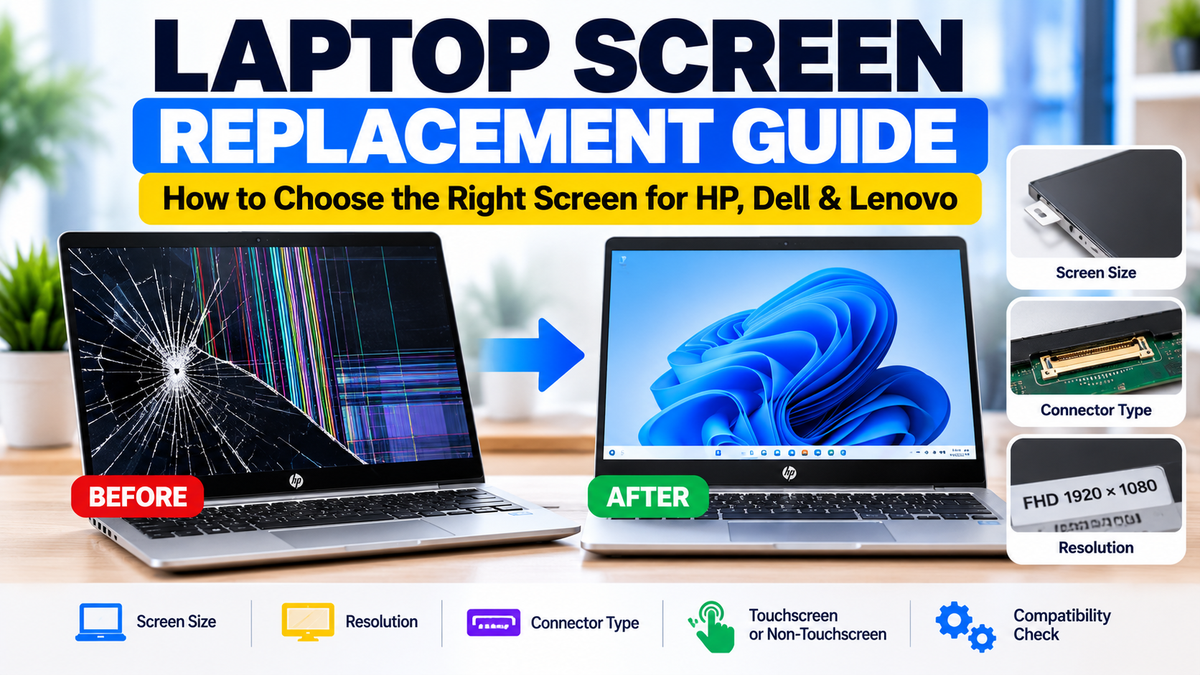
Two laptop screens can have the same size and look almost identical but still be incompatible. The connector, resolution, mounting design, touchscreen technology, and panel specifications may be different.
Whether you're replacing an HP EliteBook screen, repairing a Dell Latitude, or buying a Lenovo ThinkPad display, choosing the correct replacement is essential.
In this guide, we'll explain how to identify laptop screen problems, choose a compatible replacement, understand the factors affecting screen replacement prices in Nigeria, and decide whether repairing your laptop is worth it.
1. How Do You Know If Your Laptop Screen Needs Replacement?
Not every display problem means the laptop screen itself is damaged.
A faulty display cable, graphics driver, motherboard, or backlight circuit can sometimes produce symptoms similar to a broken screen.
However, certain signs strongly suggest that the display panel may need replacement.
Common Signs of Laptop Screen Damage
- Visible cracks: The screen glass or internal display layers are broken.
- Black patches: Dark areas appear across part of the display.
- Coloured lines: Persistent vertical or horizontal lines appear on the screen.
- Ink-like marks: Dark, spreading blotches appear beneath the screen surface.
- Flickering: The display repeatedly flashes or becomes unstable.
- Partial display: One section of the screen works while another section remains blank.
- No visible image: The laptop powers on, but nothing appears on the built-in display.
Some of these symptoms can also be caused by other components. A proper diagnosis helps prevent unnecessary replacement costs.
2. Laptop Screen Broken or Motherboard Problem? How to Check
Before buying a replacement screen, it's useful to determine whether the problem is limited to the laptop's built-in display.
Method 1: Connect an External Monitor
If your laptop supports an external display, connect it to a compatible monitor or television using HDMI, DisplayPort, USB-C video output, or another supported connection.
If the external monitor displays an image correctly while the laptop screen remains blank or distorted, the problem may involve the internal display panel, display cable, or associated circuitry.
However, this test does not identify the exact faulty component.
Method 2: Observe the Screen During Startup
Restart the laptop and check whether the problem appears before Windows or another operating system loads.
If lines, discolouration, or distortion appear in the manufacturer's startup screen or firmware interface, the issue is more likely to involve hardware than an ordinary software setting.
Method 3: Check for Physical Damage
Inspect the display for cracks, pressure marks, black patches, and visible liquid damage.
Physical damage is a strong indication that the panel may need replacement.
Method 4: Seek Professional Diagnosis
If the cause remains uncertain, have a qualified technician inspect the laptop before ordering parts.
3. Five Things to Check Before Buying a Laptop Replacement Screen
This is the most important part of the buying process.
Before purchasing a replacement screen for your HP, Dell, Lenovo, or another laptop, verify these five details.
1. Exact Laptop Model
Start with the full model number, not just the brand.
For example:
- HP EliteBook 840 G5
- HP EliteBook 830 G6
- Dell Latitude 5490
- Lenovo ThinkPad T480
Even within the same laptop series, different configurations may have different screen options.
Some models are available with HD, Full HD, touchscreen, non-touchscreen, or privacy-screen configurations.
Therefore, the laptop model is a starting point, not always sufficient proof of compatibility.
2. Screen Size
Common laptop screen sizes include 11.6 inches, 12.5 inches, 13.3 inches, 14 inches, 15.6 inches, and 16 inches.
The size is normally measured diagonally across the active display area.
A 14-inch replacement screen is not automatically compatible with every 14-inch laptop.
Other specifications must match.
3. Screen Resolution
Resolution refers to the number of pixels displayed on the screen.
| Display type | Common resolution | Typical description |
|---|---|---|
| HD | 1366 × 768 | Basic display |
| Full HD | 1920 × 1080 | Sharper text and more workspace |
| WUXGA | 1920 × 1200 | Taller 16:10 display |
| QHD | 2560 × 1440 | Higher pixel density |
| 4K UHD | 3840 × 2160 | Very high resolution |
Not every laptop supports every display resolution.
Upgrading from HD to Full HD may require a different display cable or other compatible hardware, depending on the laptop model.
For the most straightforward replacement, choose a screen with specifications verified against the original display assembly.
4. Connector Type and Position
Laptop screens use internal connectors that transmit video signals and, depending on the design, other functions.
Many modern laptop displays use embedded DisplayPort, commonly called eDP.
Different panels may have 30-pin or 40-pin connectors, but pin count alone does not establish compatibility.
Connector position, pin assignment, signalling requirements, and display-cable compatibility must also be considered.
Never assume that two screens are interchangeable simply because their connectors have the same number of pins.
5. Touchscreen and Mounting Design
A touchscreen laptop may use a display assembly that includes additional touch-related components, cables, or glass.
Some touchscreen assemblies are bonded together and cannot be replaced in the same way as a conventional non-touch panel.
Also check the mounting arrangement, including brackets, screw locations, adhesive mounting, bezel design, and panel thickness.
A replacement screen must physically fit inside the laptop's display housing.
4. What Is the Difference Between 30-Pin and 40-Pin Laptop Screens?
When shopping for replacement laptop screens, you'll frequently see descriptions such as "14-inch FHD 30-pin" or "15.6-inch 40-pin."
These terms describe the number of electrical contacts in a connector.
However, the actual connector standard and pin assignment are more important than the number alone.
| Feature | 30-pin | 40-pin |
|---|---|---|
| Common applications | Many standard laptop panels | Various higher-bandwidth or touch-related designs |
| Universal compatibility? | No | No |
| What to verify | Panel part number, pin assignment, cable, position | Panel part number, pin assignment, cable, position |
There are different 40-pin arrangements, and they are not all interchangeable.
For this reason, technicians should confirm the exact panel specifications and supported replacements before installation.
5. Touchscreen vs Non-Touchscreen Laptop Replacement
Some laptops are available in both touchscreen and non-touchscreen configurations.
Although the computers may look similar, their display assemblies can be different.
Non-Touchscreen Displays
Many conventional laptop screens consist of an LCD panel mounted inside the display housing.
Depending on the model, the panel may be replaced separately.
Touchscreen Displays
Touchscreen laptops use additional components to detect touch input.
Depending on the design, the touch digitiser may be separate from the display panel or bonded to it.
Convertible laptops, detachable tablets, and premium touchscreen devices may require complete display assemblies.
For example, an HP Elite x2 detachable tablet may require a very different replacement assembly from a conventional HP EliteBook laptop.
Buying Tip: When replacing a touchscreen, confirm whether the advertised product includes the LCD panel, touch digitiser, glass, frame, and any required cables.
6. How Much Does Laptop Screen Replacement Cost in Nigeria?
The cost of replacing a laptop screen in Nigeria depends on several factors.
There is no single price that applies to every HP, Dell, Lenovo, or Apple laptop.
Factors That Affect Laptop Screen Replacement Prices
- Screen size: Different sizes have different parts costs and availability.
- Resolution: HD, Full HD, and higher-resolution panels may have different prices.
- Touchscreen technology: Touch-enabled assemblies can cost more than basic non-touch panels.
- Laptop model: Some replacement screens are widely available, while others are uncommon.
- Panel quality: Brightness, colour accuracy, refresh rate, and other features can affect cost.
- Assembly type: A complete display assembly may cost more than a standalone panel.
- Availability: Import costs, exchange rates, and stock levels can influence Nigerian market prices.
- Installation: Technician labour and the complexity of the repair affect the final bill.
A basic non-touch display may cost considerably less than a specialised touchscreen or premium high-resolution assembly.
Before accepting a quotation, ask whether it covers the replacement part alone or includes installation and testing.
For current product pricing, browse laptop replacement screens on Shopinverse.
7. HP Laptop Screen Replacement: What Should You Check?
HP manufactures several laptop families, including EliteBook, ProBook, Pavilion, Envy, Spectre, and ZBook.
Replacement screens vary across these families and sometimes between configurations of the same model.
For example, an HP EliteBook 840 G5 may be configured with different display options.
When buying an HP replacement screen, confirm:
- The full model and generation.
- The original display resolution.
- Whether the screen supports touch.
- The display cable and connector specifications.
- The panel part number or HP spare-part reference.
- The mounting and display assembly design.
Don't assume an HP EliteBook 840 G5 screen will fit another HP laptop simply because both have 14-inch displays.
Explore HP Replacement Screens →
8. Dell Laptop Screen Replacement: What Should You Check?
Dell Latitude, Inspiron, Vostro, XPS, and Precision laptops use a variety of display configurations.
Some Dell models have multiple screen options, including different resolutions, brightness levels, touchscreen capabilities, and cable arrangements.
When replacing a Dell laptop screen, check the exact model and original panel specifications.
If available, use the Dell Service Tag to look up the laptop's original configuration and support documentation.
For example, a Dell Latitude with a standard non-touchscreen panel may require a different display assembly from a touchscreen configuration of the same model.
Explore Dell Replacement Screens →
9. Lenovo Laptop Screen Replacement: What Should You Check?
Lenovo ThinkPad, IdeaPad, Yoga, and ThinkBook laptops also use different display designs.
For ThinkPad models, the exact machine type and configuration can help identify compatible replacement parts.
When shopping for a Lenovo replacement screen, confirm:
- The complete laptop model and machine type.
- The LCD panel or Lenovo replacement part number.
- Screen size and resolution.
- Connector and cable compatibility.
- Touchscreen and mounting requirements.
Some Lenovo Yoga convertible laptops use integrated touchscreen assemblies that differ significantly from standard ThinkPad displays.
Explore Lenovo Replacement Screens →
10. How to Find Your Laptop Screen Part Number
The panel part number is one of the most useful details when identifying a compatible replacement.
However, it is not always visible without opening the display assembly.
Method 1: Check Manufacturer Documentation
Search the manufacturer's support website using the exact laptop model, serial number, Service Tag, or machine type as applicable.
Look for a parts list, maintenance guide, or display assembly information.
Method 2: Check the Original Screen Label
A technician may be able to identify the original panel model from a label on the rear of the screen.
Examples of LCD panel manufacturers include BOE, AUO, LG Display, Innolux, and Samsung Display.
Matching the original panel number can make it easier to identify a compatible replacement.
Method 3: Use System Information Tools
Some diagnostic tools can report display identification data from the panel.
However, this information may be incomplete or unavailable, and it does not always provide enough detail to confirm a replacement.
11. Should You Replace the Screen or Buy Another Laptop?
Sometimes replacing a damaged screen is the most economical option. Other times, purchasing another laptop may offer better value.
Consider the following questions:
- Is the screen the only damaged component?
- Does the laptop still perform well for your daily activities?
- Is the battery in good condition?
- Does the laptop support the software you need?
- How much will the replacement screen and installation cost?
- What is the current value of a comparable working laptop?
When Screen Replacement Makes Sense
Replacing the screen is often reasonable when the laptop is otherwise functional, the repair cost is affordable, and the computer still meets your needs.
For example, a business owner using a reliable laptop for invoicing, spreadsheets, and customer management may find screen replacement more economical than purchasing another computer.
When Buying Another Laptop May Be Better
Consider replacing the laptop if it has several major problems, requires expensive repairs, or can no longer run essential software securely.
A laptop with a damaged screen, failing battery, motherboard problems, and outdated hardware may not be worth a substantial repair investment.
Repair Your Laptop or Replace It?
Shopinverse offers laptop replacement parts and a selection of pre-owned computers.
Compare the cost of repairing your current laptop with the available alternatives before making a decision.
12. Original vs Compatible Laptop Screens: Which Is Better?
When buying replacement screens, you may encounter original manufacturer parts, original-equipment panels, and compatible third-party replacements.
An original or manufacturer-approved replacement is generally a straightforward choice when available.
However, a properly verified compatible panel may also be suitable.
The important factors include:
- Electrical compatibility.
- Correct connector and cable arrangement.
- Physical dimensions and mounting.
- Resolution and refresh-rate support.
- Brightness and colour quality.
- Touchscreen functionality, where required.
- Warranty and supplier reliability.
Be cautious of replacement screens advertised as universally compatible without detailed specifications.
13. Laptop Screen Replacement Buying Checklist
Before ordering a laptop replacement screen in Nigeria, confirm the following:
- Exact laptop model: Include the generation and configuration.
- Original panel part number: Obtain it where possible.
- Screen size: Confirm the diagonal measurement.
- Resolution: Match the original or a manufacturer-supported alternative.
- Connector: Verify the exact interface, pin assignment, and position.
- Touch support: Confirm whether the laptop requires a touch assembly.
- Mounting: Check brackets, dimensions, and attachment design.
- Included components: Determine whether the listing includes the panel only or a complete assembly.
- Condition: Confirm whether the replacement is new or pre-owned.
- Warranty: Review the applicable terms before purchasing.
If you're unsure about compatibility, ask the seller or technician to verify the replacement before installation.
14. Frequently Asked Questions About Laptop Screen Replacement
Can I replace a laptop screen myself?
Some laptop screens can be replaced by experienced users with the correct tools and service instructions. However, modern displays often contain delicate cables, adhesive, glass, and other components. Professional installation is recommended if you're inexperienced.
Can I use any 14-inch screen for my 14-inch laptop?
No. Screen size alone does not guarantee compatibility. Resolution, connector type, panel dimensions, mounting, and other specifications must also match.
Can I replace an HD laptop screen with Full HD?
Sometimes, but not always. The laptop must support the higher-resolution panel, and a compatible display cable or other parts may be required.
Does a cracked laptop screen always need replacement?
If the actual LCD panel is cracked, replacement is usually necessary. If only an outer protective layer is damaged, repair options depend on the display assembly design.
Why does my laptop screen have vertical lines?
Vertical lines may result from panel damage, a faulty display cable, graphics-related problems, or other hardware faults. Diagnosis is needed to identify the cause.
Can a laptop screen be repaired without replacement?
Some display problems can be fixed by repairing cables, connections, software, or other components. However, physically cracked LCD panels generally require replacement.
How much is an HP laptop screen in Nigeria?
The price depends on the exact HP model, screen size, resolution, touchscreen capability, and availability. Check current listings and confirm compatibility before purchasing.
Is a 30-pin screen compatible with a 40-pin screen?
Not directly. These connectors have different configurations. A replacement must be compatible with the laptop's display system and cable.
Can I change my non-touchscreen laptop to touchscreen?
Not in most cases through a simple panel swap. A touchscreen conversion may require different cables, a digitiser, compatible firmware, and other hardware. Many laptops do not support such upgrades.
Where can I buy laptop replacement screens in Nigeria?
You can explore laptop replacement screens at Shopinverse and compare available parts for supported HP, Dell, Lenovo, and other laptop models.
Final Thoughts: Don't Buy a Laptop Screen Based on Size Alone
A damaged laptop screen does not always mean you need to replace your entire computer.
With the correct replacement part and proper installation, many laptops can return to normal operation.
However, choosing the wrong screen can lead to wasted money, installation problems, or further hardware damage.
Before buying, confirm the exact laptop model, original panel specifications, connector compatibility, resolution, and mounting arrangement.
Remember: The right replacement screen is not simply the one that looks similar. It is the one that is confirmed compatible with your laptop.
Looking for Laptop Replacement Parts?
Explore available replacement screens, laptop components, and accessories at Shopinverse.
Check the specifications carefully and confirm compatibility before placing your order.
Editor's note: Screen compatibility, product availability, and replacement prices vary by model and configuration. Always confirm the exact replacement part and consult a qualified technician when necessary.

Share: