

 Laptops
 Phones & tablets
 Desktops
 Computer Parts
 Accessories
You want to learn programming, so you start searching for a laptop in Nigeria.
One person tells you to buy a Core i7. Another insists that you need 16GB RAM and dedicated graphics. Someone else recommends an expensive MacBook.
Before you know it, you're confused about what to buy and whether your budget is enough.
But here's something many beginners don't realize:
You don't need the most expensive laptop to start learning programming.
The right laptop depends on what you're learning, the software you'll use, and how demanding your projects will become.
A student learning HTML, CSS, and JavaScript does not necessarily need the same computer as a developer building Android applications, running virtual machines, or training artificial intelligence models.
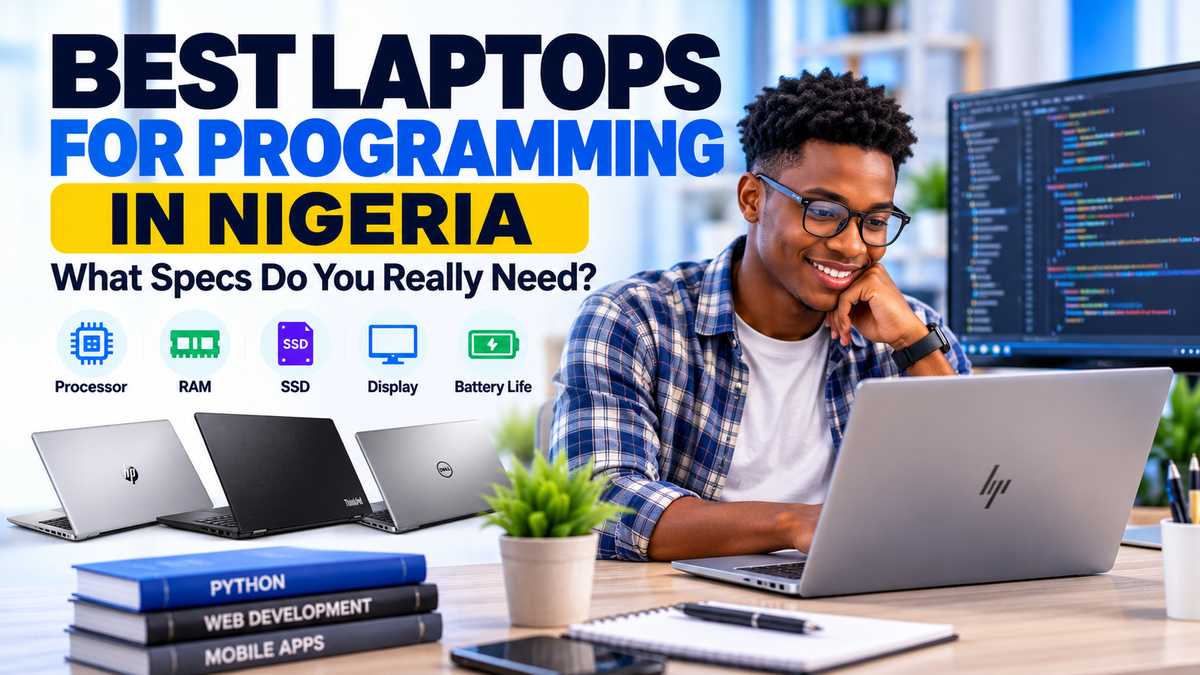
In this guide, we'll explain the best laptop specifications for programming in Nigeria, compare different coding activities, and recommend practical laptop options for students, beginners, and professional developers.
1. Can You Learn Programming With an Affordable Laptop?
Yes. Many programming activities do not require an expensive computer.
If you're learning HTML, CSS, JavaScript, Python, or basic web development, you can begin with a modest laptop that meets the requirements of your development tools.
For example, a beginner learning HTML and CSS may only need:
- A reliable laptop with a supported operating system.
- A code editor such as Visual Studio Code.
- A modern web browser.
- An internet connection for tutorials and research.
- Enough RAM and storage for smooth everyday operation.
However, affordability should not mean buying a laptop that is too old, unreliable, or incompatible with the software you intend to use.
When choosing a used laptop in Nigeria, consider processor generation, RAM, SSD capacity, battery condition, and long-term software support.
Buying a slightly better laptop that will remain useful as your skills improve can save you money in the long run.
2. What Laptop Specifications Do You Need for Programming?
Let's examine the important specifications and how they affect coding performance.
Processor: Core i5, Core i7, or AMD Ryzen?
The processor, also called the CPU, handles instructions and calculations performed by your computer.
For everyday programming, a modern Intel Core i5 or AMD Ryzen 5 is often sufficient.
Core i7 and Ryzen 7 processors can be useful for more demanding workloads, but the name alone does not guarantee better performance.
A newer Core i5 may outperform an older Core i7 depending on the exact models.
Pay attention to processor generation, core count, sustained performance, and software compatibility rather than buying based on Core i5 or Core i7 branding alone.
RAM: Is 8GB Enough for Programming?
RAM is the temporary working memory used by your applications.
For basic programming, 8GB RAM can be sufficient.
However, 16GB RAM is a better target if you regularly open multiple browser tabs, use an integrated development environment (IDE), run local servers, or work with databases.
For demanding development environments, virtual machines, containers, and large projects, 32GB or more may be beneficial.
Storage: Why an SSD Matters
An SSD helps your laptop boot faster, open applications quickly, and access project files more efficiently than a traditional hard drive.
We recommend:
- 256GB SSD: A practical minimum for beginners with lightweight projects.
- 512GB SSD: Better for developers installing several tools, frameworks, and project dependencies.
- 1TB SSD or more: Useful for large projects, virtual machines, mobile development, and substantial local datasets.
Remember that development tools, operating systems, SDKs, and project dependencies can consume significant storage over time.
Display: Is Full HD Necessary?
Programming involves reading and writing text for long periods.
A Full HD display with a resolution of 1920 × 1080 is a practical choice because it provides more working space than a basic HD screen of similar size.
A 13.3-inch laptop can be convenient for students who move between classes, while 14-inch and 15.6-inch laptops may provide more comfortable screen space.
For long coding sessions, consider using an external monitor when your budget permits.
Battery Life and Keyboard
Battery condition matters, especially in Nigeria, where electricity availability may affect your study or work schedule.
Choose a laptop with a healthy battery and a comfortable keyboard.
A backlit keyboard can also be useful when working in environments with limited lighting.
For used laptops, ask about actual battery condition rather than relying only on the manufacturer's original battery-life claims.
3. Recommended Laptop Specifications for Different Programming Activities
Not every developer needs the same hardware.
| Programming activity | Practical CPU target | RAM target | Storage target |
|---|---|---|---|
| HTML, CSS, JavaScript | Modern Core i3/i5 or Ryzen 3/5 | 8GB+ | 256GB SSD+ |
| Python programming | Modern Core i5 or Ryzen 5 | 8–16GB | 256GB SSD+ |
| Full-stack web development | Modern multicore Core i5/Ryzen 5 or better | 16GB+ | 512GB SSD+ |
| Android development with emulator | Supported modern multicore CPU with virtualization | 16GB minimum for common Windows Studio-plus-emulator setups; 32GB preferable | 512GB SSD+ |
| Docker and virtual machines | Modern multicore CPU | 16–32GB+ | 512GB SSD+ |
| Machine learning | Workload-dependent | 16–32GB+ | 512GB SSD+ |
These are practical buying targets, not universal software minimum requirements. Always verify the requirements of the specific applications you intend to use.
4. Best Laptop for HTML, CSS, JavaScript, and Web Development
If you're learning frontend development, you don't need a powerful gaming laptop.
Most beginners work with a code editor, browser, terminal, and a few development tools.
A laptop with a supported Core i5 processor, 8GB RAM, and a 256GB SSD can be a good starting point.
However, if you intend to work with React, Next.js, Node.js, local databases, and multiple development services, 16GB RAM will generally provide more comfortable multitasking.
Recommended configuration: Modern Core i5 or Ryzen 5, 16GB RAM, 512GB SSD, and Full HD display.
For budget-conscious beginners, 8GB RAM and 256GB SSD can still be workable.
5. Best Laptop for Python Programming
Python is used for automation, backend development, data analysis, artificial intelligence, and many other applications.
The laptop you need depends on how you plan to use Python.
For learning syntax, writing simple scripts, and solving programming exercises, a modest laptop is sufficient.
For data analysis involving large datasets, machine learning, or running multiple services, more RAM and processor performance may be required.
Some machine learning workloads also benefit from dedicated graphics hardware, although beginners can use cloud-based environments for selected tasks.
Recommended starting configuration: Modern Core i5 or Ryzen 5, 8–16GB RAM, and 256GB SSD or larger.
6. Best Laptop for Android App Development
Android app development can be more demanding than basic web development.
Developers often use Android Studio, an emulator, build tools, and other background services.
For a Windows laptop running Android Studio with an emulator, Google's published requirements specify 16GB RAM as a minimum and recommend 32GB for a better experience.
Processor virtualization support and sufficient SSD storage are also important.
If your budget is limited, testing applications on a compatible physical Android phone may reduce the need to run an emulator, although it does not remove the other software requirements.
Recommended configuration: A modern multicore processor, 16GB RAM or more, and preferably 512GB SSD or larger.
Before buying, consult the official Android Studio system requirements.
7. Do Programmers Need a Dedicated Graphics Card?
Not necessarily.
For web development, Python fundamentals, general software development, and many backend programming tasks, integrated graphics are usually sufficient.
A dedicated GPU becomes more relevant for activities such as:
- 3D game development.
- GPU-accelerated machine learning.
- Complex 3D simulations.
- Graphics-intensive development environments.
Even then, compatibility with the specific software framework matters more than simply having a graphics card with a large memory capacity.
For example, certain machine learning workflows depend on specific GPU architectures, drivers, and software support.
Don't spend extra money on dedicated graphics unless your intended workload will benefit from them.
8. Windows vs Linux vs MacBook: Which Is Best for Programming?
All three platforms can be suitable for programming, but they have different strengths.
Windows Laptops
Windows laptops are widely available in Nigeria across many price ranges.
They support popular development tools such as Visual Studio Code, Python, Git, and many IDEs.
Windows Subsystem for Linux (WSL) can also provide a Linux development environment on compatible Windows systems.
Linux Laptops
Linux is popular among developers who work with servers, backend systems, open-source tools, and command-line environments.
It can run well on many compatible business laptops, although hardware and software support should be checked.
Apple MacBooks
MacBooks are popular for development and are particularly relevant for creating applications for Apple's platforms.
For native iOS app development, Xcode requires a compatible version of macOS, which makes a supported Mac an important consideration.
Older MacBooks may not support the latest macOS or Xcode versions, so confirm software compatibility before purchasing a used MacBook for iOS development.
9. Best Used Laptops for Programming in Nigeria
If you're shopping for a programming laptop in Nigeria, business-class models from HP, Dell, and Lenovo are worth considering.
Here are some practical configurations available through Shopinverse.
HP EliteBook 830 G7 — Portable for Students and Beginners
The HP EliteBook 830 G7 is a compact business laptop suitable for students, coding beginners, and professionals who prefer portability.
A configuration with a 10th Generation Core i5 processor, 16GB RAM, and 256GB SSD provides a practical foundation for web development, Python, and general programming.
Its 13.3-inch display makes it convenient to carry between classes or workplaces.
Best for: Students, beginners, frontend development, and everyday programming.
Lenovo ThinkPad T14 Gen 1 — A Strong All-Round Option
The Lenovo ThinkPad T14 Gen 1 is a professional business laptop with a practical combination of portability, keyboard comfort, and connectivity.
The 10th Generation Core i5 configuration with 16GB RAM and 256GB SSD is suitable for web development, general programming, and moderate multitasking.
Its 14-inch Full HD display offers a comfortable balance between screen space and portability.
Best for: Web developers, software development students, and professionals working with multiple applications.
View Lenovo ThinkPad T14 Gen 1 →
HP EliteBook 840 G7 — Comfortable Everyday Coding
The HP EliteBook 840 G7 offers a 14-inch display and business-class design.
Configurations with a 10th Generation Core i5 processor, 16GB RAM, and 256GB SSD can handle common development tools and everyday multitasking.
Best for: Programming students, web developers, and office professionals learning coding.
HP ZBook Firefly — For Developers Needing More Flexibility
HP ZBook Firefly laptops are professional mobile workstation models available in different configurations.
They may be useful for developers who combine programming with design, technical applications, or more demanding workloads.
However, workstation branding does not automatically mean every configuration has a powerful dedicated GPU. Always check the actual processor, RAM, graphics, and storage specifications.
Best for: Developers who also work with technical or creative applications, depending on configuration.
Explore Laptops for Programming at Shopinverse
Compare available HP, Dell, Lenovo, and other laptop configurations based on your programming needs and budget.
Choose a laptop that can support your current learning goals while allowing room for future development.
Shop Programming Laptops →10. What Laptop Should You Buy for Programming on a Budget?
Instead of focusing on one fixed price, choose your laptop according to the complexity of your work.
| Buyer category | Suggested configuration | Typical use |
|---|---|---|
| Budget beginner | Supported modern Core i5/Ryzen 5, 8GB RAM, 256GB SSD | HTML, CSS, JavaScript, Python basics |
| Growing developer | Modern multicore CPU, 16GB RAM, 512GB SSD | Full-stack development, local databases |
| Advanced developer | Higher-performance multicore CPU, 32GB RAM, 512GB–1TB SSD | Virtual machines, containers, demanding IDEs |
Prices change depending on the laptop model, condition, specifications, and availability.
Visit the Shopinverse programming laptops collection to compare current options.
11. What to Check Before Buying a Used Laptop for Programming
Used laptops can offer excellent value, but they should be inspected carefully.
- Processor: Check the exact CPU model and its performance capabilities.
- Operating system: Confirm compatibility with your intended development tools and supported software versions.
- RAM: Check the installed capacity and whether upgrades are possible.
- SSD: Confirm storage capacity and drive health.
- Display: Inspect the screen and check its resolution.
- Keyboard: Test every key, especially those used frequently when coding.
- Battery: Check its condition and practical runtime.
- Ports: Test USB, USB-C, HDMI, and other required connections.
- Cooling: Watch for overheating or unusually loud fans.
- Warranty: Understand the seller's warranty terms before payment.
For students attending coding classes or developers working outside the office, battery condition, portability, and reliable charging can be just as important as processor performance.
12. Common Mistakes to Avoid When Buying a Programming Laptop
Mistake 1: Buying Based on Core i7 Alone
An older Core i7 is not automatically better than a newer Core i5. Compare the exact processor models.
Mistake 2: Choosing 4GB RAM for Demanding Development
While some lightweight programming tasks can run on 4GB RAM, it offers limited flexibility for modern development environments.
Mistake 3: Ignoring Storage Capacity
A 128GB SSD may become restrictive once you install development tools, SDKs, operating system updates, and project files.
Mistake 4: Paying Extra for Graphics You Don't Need
Most beginners learning web development do not need a dedicated graphics card.
Mistake 5: Buying Without Checking Software Compatibility
Some development tools require specific operating system versions, processor architectures, or hardware features.
Check these requirements before purchasing your laptop.
13. Frequently Asked Questions
Is Core i5 good for programming?
Yes. A capable modern Core i5 processor is suitable for many programming tasks, including web development, Python, and general software development. The exact model and workload matter.
Can I learn programming with 8GB RAM?
Yes. 8GB RAM is a practical starting point for lightweight programming. For heavier IDEs, local databases, emulators, or multitasking, 16GB or more is preferable.
Is 256GB SSD enough for programming?
It can be sufficient for beginners, but 512GB offers more room for development tools, dependencies, and projects.
Do I need a gaming laptop for coding?
No. Most general programming tasks do not require gaming hardware. Gaming laptops may be useful for game development or other graphics-intensive workloads.
Can I use a Chromebook for programming?
Some Chromebooks support Linux development environments and browser-based coding tools. However, compatibility varies by model, software support status, processor, and available storage. Check carefully before purchasing.
Is a MacBook better than a Windows laptop for programming?
Neither is universally better. Windows, Linux, and macOS all support popular development workflows. Native Apple-platform development has specific macOS and Xcode requirements.
Can I learn Python on a used laptop?
Yes. A reliable used laptop with a compatible operating system, sufficient RAM, and an SSD can be suitable for learning Python.
What is the best laptop for a computer science student in Nigeria?
A modern Core i5 or Ryzen 5 laptop with 8–16GB RAM and an SSD is a practical starting point for many students. Check your department's required software before buying.
Where can I buy a laptop for programming in Nigeria?
Explore the Shopinverse Laptops for Programming collection to compare available models and specifications.
Final Thoughts: Buy the Laptop Your Programming Goals Actually Require
The best laptop for programming in Nigeria is not necessarily the most expensive one.
If you're learning HTML, CSS, JavaScript, or basic Python, you can begin with a capable, affordable laptop.
If you're planning to work with Android Studio, virtual machines, large development projects, or machine learning, you may need more RAM, storage, processor performance, or specialized hardware.
Focus on the applications you'll use, the projects you intend to build, and your available budget.
Start with a laptop that meets your needs today, but consider enough flexibility for the skills you'll develop tomorrow.
Find Your Programming Laptop at Shopinverse
Whether you're learning coding, studying computer science, or building professional applications, explore available laptops suited to different development workloads.
Editor's note: Product availability, specifications, software requirements, and prices may change. Confirm the exact laptop configuration and the requirements of your development tools before purchasing.
Share: