

 Laptops
 Phones & tablets
 Desktops
 Computer Parts
 Accessories
You've just bought a laptop, but there's one problem: it doesn't have enough ports for all your accessories.
You want to connect an external monitor, keyboard, mouse, flash drive, Ethernet cable, and perhaps charge the laptop through the same USB-C connection.
While shopping for accessories in Nigeria, you discover two options: a USB-C hub and a laptop docking station.
They look similar, but their features, capabilities, and prices can be very different.
So, which one should you buy?
In this guide, we'll explain the difference between a USB-C hub and a docking station, compare their features, discuss laptop compatibility, and help you choose the right accessory for your needs.
1. What Is a USB-C Hub?
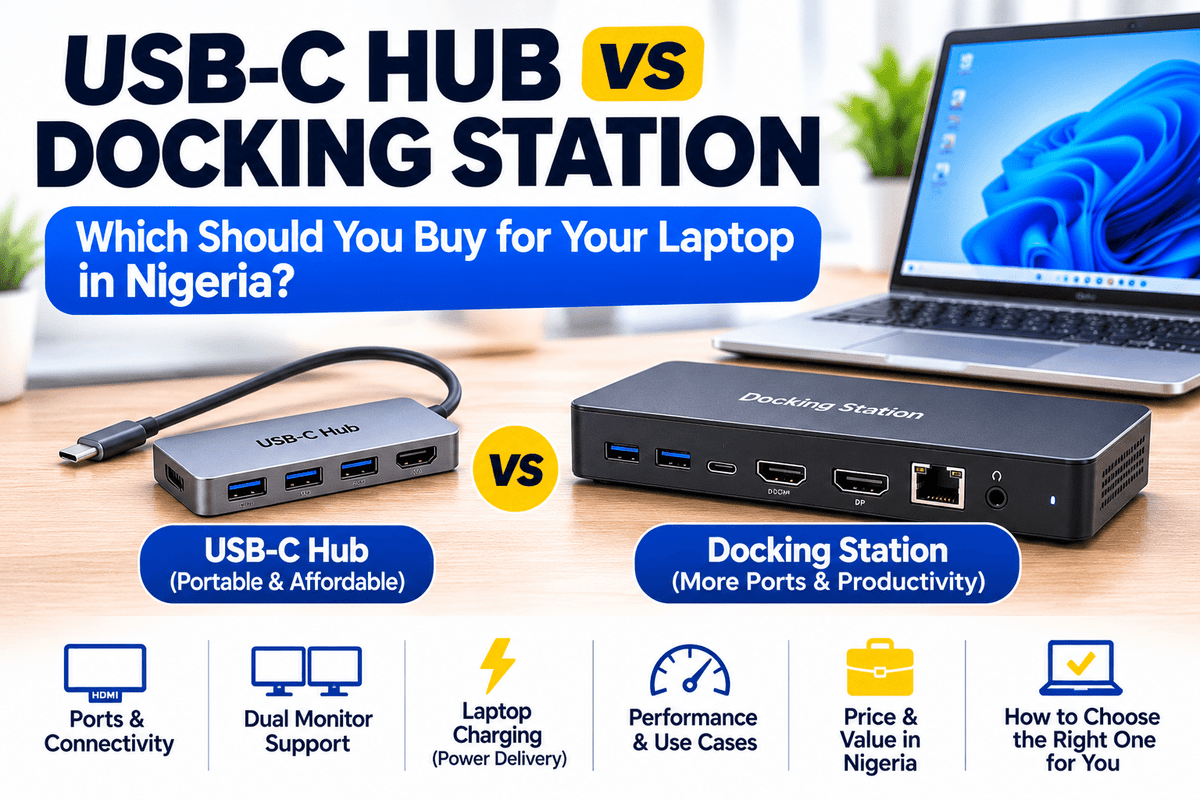
A USB-C hub is an accessory that expands a laptop's available connections by using one USB-C port to provide several additional ports.
Depending on the model, a USB-C hub may include:
- USB-A ports for keyboards, mice, and flash drives.
- Additional USB-C data ports.
- HDMI output for a monitor.
- SD or microSD memory card slots.
- Ethernet connectivity.
- USB-C Power Delivery passthrough.
Not every hub includes all these features.
Some affordable hubs provide only additional USB data ports, while more advanced models offer HDMI, Ethernet, and charging support.
Who Should Buy a USB-C Hub?
A USB-C hub is often suitable for:
- Students connecting flash drives and external keyboards.
- Professionals who travel frequently.
- People who occasionally connect a laptop to a monitor.
- Users with laptops that have limited USB ports.
- Anyone who wants a compact accessory that fits easily inside a laptop bag.
Example: If your laptop has only one available USB-C port and you need to connect a mouse, keyboard, and flash drive, a compatible USB-C hub may be all you need.
2. What Is a Laptop Docking Station?
A docking station is an accessory designed to connect a laptop to several peripherals, often creating a more complete desktop-style workstation.
Depending on the model and laptop compatibility, a docking station may support:
- One or more external monitors.
- USB keyboards and mice.
- External storage devices.
- Wired Ethernet networking.
- Audio devices.
- Laptop charging through USB-C Power Delivery.
- Multiple peripherals through a single laptop connection.
Many docking stations are designed to remain on an office desk, although compact travel docks are also available.
Who Should Buy a Docking Station?
A docking station may be more useful for:
- Office workers with permanent desks.
- Accountants and data analysts using external monitors.
- Business owners managing several applications.
- Content creators working with external storage and displays.
- Remote workers building home-office workstations.
- Professionals who frequently connect and disconnect their laptops from a desk setup.
Example: An accountant could connect a laptop to a docking station that supports two monitors, a keyboard, mouse, and Ethernet cable, provided the laptop and dock support the required configuration.
3. USB-C Hub vs Docking Station: Main Differences
| Feature | USB-C Hub | Docking Station |
|---|---|---|
| Main purpose | Expand available ports | Connect a complete workstation |
| Portability | Usually compact | Often larger, though travel docks exist |
| USB ports | Varies by model | Often more extensive |
| External monitors | Some support video output | Often designed for multiple displays |
| Laptop charging | Some offer PD passthrough | Many powered models support charging |
| Ethernet | Available on some models | Common on business docks |
| Power adapter | Often bus-powered | Many require external power |
| Typical cost | Often less expensive | Often more expensive |
| Best use | Travel and basic accessories | Permanent office setups |
These are general differences rather than strict technical categories. A premium hub may support features found in docking stations, while a basic docking station may have relatively few ports.
4. Can Every USB-C Port Connect to a Monitor?
No. This is one of the most important things to understand before buying a USB-C hub or docking station.
Just because your laptop has a USB-C port does not mean it can send video to an external monitor through that port.
USB-C describes the physical connector. The features supported by that connector depend on the laptop's hardware.
USB-C Data Support
Some USB-C ports are designed primarily for data transfer and compatible USB accessories.
These ports may not support direct video output or laptop charging.
DisplayPort Alternate Mode
DisplayPort Alternate Mode, often called DP Alt Mode, allows supported USB-C connections to carry display signals.
A compatible USB-C hub or docking station may use this capability to provide HDMI or DisplayPort outputs.
Thunderbolt and USB4
Some laptops feature Thunderbolt or USB4 ports that can support high-speed data and external displays.
However, capabilities vary by implementation, device generation, and accessory requirements.
Always verify the exact specifications of the laptop and dock rather than relying on the connector's appearance.
5. USB-C Hub With HDMI vs Docking Station: Which Is Better for Monitors?
If you want to connect an external monitor, both a suitable USB-C hub and a docking station may work.
The important factors include:
- Whether the laptop supports video through its USB-C port.
- The hub or dock's supported video outputs.
- Maximum resolution and refresh rate.
- Number of monitors supported simultaneously.
- Available display bandwidth.
- Whether drivers or specialised display technology are required.
Connecting One Monitor
A compatible USB-C hub with HDMI may be sufficient for connecting one external monitor.
For example, you may connect your laptop to a larger screen for presentations, spreadsheets, or online meetings.
Connecting Two External Monitors
A docking station with multiple display outputs may be more suitable.
However, having two HDMI or DisplayPort connectors does not automatically guarantee that your laptop can use two independent external monitors.
Some docking stations rely on DisplayPort Multi-Stream Transport, while others use Thunderbolt, USB4, or driver-based display technologies.
The operating system, laptop graphics hardware, USB-C capabilities, and docking station specifications determine the supported arrangement.
Connecting High-Resolution Monitors
Check whether the accessory supports your monitor's required resolution and refresh rate, such as Full HD at 60Hz or 4K at 60Hz.
Some hubs advertise 4K output but support only lower refresh rates under certain conditions.
For professional use, confirm the exact supported display configuration before purchasing.
6. Can a USB-C Hub or Docking Station Charge Your Laptop?
Some USB-C hubs and many powered docking stations support laptop charging through USB Power Delivery (USB PD).
But this requires compatibility between the laptop, accessory, cable, and power source.
USB-C Hub Charging
A hub with Power Delivery passthrough may allow you to connect a compatible USB-C charger to the hub while the hub supplies power to the laptop.
However, some of the input power may be used by the hub itself.
For example, a hub advertised with 100W PD input does not necessarily deliver the full 100W to the laptop.
Docking Station Charging
Many business docking stations use an external power adapter and can provide charging through their host USB-C connection.
However, the maximum charging power depends on the dock, laptop, and applicable power-delivery standard.
A docking station with a 120W power adapter does not necessarily deliver 120W to the connected laptop.
What About 45W, 65W, and 90W Laptops?
Check the laptop's required charging power and the dock's maximum supported host charging output.
An underpowered connection may result in slower charging, reduced performance, or battery discharge during demanding tasks.
Some laptops also require proprietary charging arrangements or higher power than a standard USB-C dock can provide.
Before buying, confirm that the dock can supply adequate power to your exact laptop model.
7. USB-C Hub vs Docking Station Prices in Nigeria
USB-C hubs and docking stations are available at different price points depending on their features, brand, condition, and included accessories.
For illustration, Shopinverse has listed the following products:
| Product | Example listed price | Main purpose |
|---|---|---|
| Yesido HB17 4-in-1 USB-C Hub | ₦13,500 | Additional USB data ports |
| Dell WD19 USB-C Dock | ₦55,000 | Office workstation connectivity |
| HP USB-C Dock G5 | ₦85,000 | Multi-device office connectivity |
These are example product listing prices, not guaranteed current prices. Availability, condition, accessories, and pricing may change.
Check the latest product page before ordering.
Explore USB-C Hubs and Docking Stations at Shopinverse →
8. Yesido HB17 4-in-1 USB-C Hub: Best for Basic Port Expansion
The Yesido HB17 is a compact USB-C hub designed to provide additional USB connectivity.
It is a practical option for laptop users who want to connect several basic USB peripherals without carrying multiple adapters.
Key Features
- Compact and portable design.
- Four USB data ports.
- Suitable for compatible USB keyboards, mice, and flash drives.
- Convenient for travel, study, and everyday office use.
Best for: Students, office workers, and laptop users who primarily need additional USB ports.
Important: The Yesido HB17 model discussed here is not listed with HDMI video output. Do not buy it expecting to connect an external monitor.
9. Dell WD19 USB-C Docking Station: Best for Business Workstations
The Dell WD19 is a business-oriented USB-C docking station designed to expand laptop connectivity.
Depending on the laptop and dock configuration, it can provide connections for external displays, USB accessories, and wired networking.
Key Features
- USB-C host connection.
- Multiple USB peripheral connections.
- External display connectivity.
- Ethernet networking.
- Power Delivery support for compatible laptops.
- Suitable for permanent desk setups.
Best for: Dell Latitude users, business professionals, accountants, remote workers, and office environments.
The WD19 may also work with compatible laptops from other manufacturers, but charging behaviour and supported features can differ.
Check the exact dock variant, power adapter, and laptop compatibility before purchasing.
View Dell WD19 USB-C Docking Station →
10. HP USB-C Dock G5: Best for Professional Office Setups
The HP USB-C Dock G5 is designed to provide a convenient connection between compatible laptops and multiple office peripherals.
It can help reduce cable clutter by connecting monitors, networking equipment, and accessories through a central docking station.
Key Features
- USB-C laptop connection.
- HDMI and DisplayPort video outputs.
- USB ports for compatible accessories.
- Wired Ethernet connectivity.
- Charging support for compatible laptops.
- Compact business-oriented design.
Best for: HP EliteBook users, business owners, office professionals, and remote workers building organised desk setups.
Shopinverse lists the HP USB-C Dock G5 with a power adapter included. Confirm the included adapter and dock condition on the current product listing.
To use its full range of features, the laptop must support the relevant USB-C capabilities, including the necessary display and power-delivery functions.
Build a Better Laptop Workstation
Shopinverse offers USB-C hubs, docking stations, laptop accessories, and connectivity solutions for different productivity needs.
Compare available ports, charging support, monitor compatibility, and included accessories before purchasing.
11. Which Is Better for Students?
For many students, a compact USB-C hub is sufficient.
It can provide additional ports for flash drives, external keyboards, and other study accessories.
If you frequently connect your laptop to a monitor at home or in a hostel, consider a hub that specifically supports video output and is compatible with your laptop.
A full docking station may be unnecessary unless you regularly use several peripherals or want a more permanent desk arrangement.
12. Which Is Better for Office Workers and Small Business Owners?
For office work, a docking station can be especially useful when several peripherals remain connected to a permanent desk.
Imagine a small business owner who uses a laptop for accounting, sales reporting, customer communication, and meetings.
At the office, the laptop connects to:
- A larger external monitor.
- A full-size keyboard.
- A wireless or wired mouse.
- An Ethernet network.
- External storage.
- A compatible charging connection.
With a suitable docking station, many of these connections can remain attached to the dock.
The business owner can connect the laptop when arriving at work and disconnect it when leaving.
This can make a laptop function more like a desktop workstation without sacrificing portability.
13. Which Is Better for Graphic Designers and Content Creators?
Creative professionals may benefit from either accessory, depending on their equipment.
A portable hub can be convenient for photographers transferring files from memory cards or connecting external drives while travelling.
A docking station may be better for a fixed editing desk with an external monitor, storage devices, Ethernet, and multiple accessories.
However, high-resolution displays and fast external storage require adequate connection bandwidth.
Check whether the accessory supports the necessary USB speeds, display resolution, and refresh rate for your workflow.
For professional colour-sensitive work, monitor quality and colour accuracy are also important.
14. Why Is My USB-C Docking Station Not Working?
If your docking station is connected but the monitor, USB devices, or charging function does not work, several issues may be responsible.
Problem 1: Laptop Does Not Support Video Through USB-C
The laptop's USB-C port may not support the display technology required by the dock.
What to do: Check the laptop manufacturer's port specifications.
Problem 2: Incorrect or Insufficient Power Adapter
Some docking stations require an external power adapter to operate correctly.
What to do: Confirm the correct adapter is connected and meets the dock's requirements.
Problem 3: USB-C Cable Limitations
Not all USB-C cables support the same data speeds, video capabilities, or charging power.
What to do: Use the dock's supplied cable or a manufacturer-approved replacement with the required capabilities.
Problem 4: Display Settings
Your laptop may not automatically activate the external monitor.
What to do: On Windows, open Settings, select System, then Display, and check the available monitor settings.
Problem 5: Driver or Firmware Issues
Some docking stations require updated drivers or firmware for certain functions.
What to do: Check the official laptop and docking station manufacturer support websites.
Problem 6: Unsupported Multi-Monitor Configuration
The laptop may not support the number of external monitors or the combined resolution and refresh rate requested.
What to do: Verify the supported display configuration in the laptop and dock documentation.
15. Seven Things to Check Before Buying a USB-C Hub or Docking Station
- USB-C port compatibility: Confirm which data, video, and charging functions your laptop supports.
- Required ports: List the USB-A, USB-C, HDMI, DisplayPort, Ethernet, and card-reader connections you need.
- Monitor support: Verify the number of external displays, resolution, and refresh rate.
- Charging wattage: Confirm whether the accessory can provide sufficient power to your laptop.
- Power adapter: Check whether the docking station includes the correct adapter.
- Cable requirements: Confirm the supplied or recommended USB-C cable supports the necessary features.
- Product condition and warranty: Check the listing carefully, especially when buying a pre-owned docking station.
If you're unsure about compatibility, provide the seller with your exact laptop model and the accessories you intend to connect.
16. Frequently Asked Questions
What is the difference between a USB-C hub and a docking station?
A USB-C hub generally expands available ports, while a docking station is often designed for a more complete workstation with multiple peripherals. Actual features vary by product.
Is a docking station better than a USB-C hub?
Not always. A docking station may be more suitable for a permanent office setup, while a compact hub may be more convenient and economical for basic connections.
Can a USB-C hub connect to HDMI?
Yes, if the hub includes HDMI output and the laptop supports the required video technology. Not every USB-C hub or laptop USB-C port supports HDMI video output.
Can I connect two monitors to a laptop using a docking station?
Yes, with a compatible laptop and docking station that support the required multi-monitor configuration. Check the operating system, graphics capabilities, display bandwidth, and dock specifications.
Does every USB-C port support charging?
No. USB-C ports have different capabilities. Confirm whether your laptop supports charging through its USB-C port and the required USB Power Delivery specifications.
Can I use an HP docking station with a Dell laptop?
Some HP USB-C docks can work with compatible Dell laptops, but video, charging, and other functions depend on the exact devices. Manufacturer-specific features may not be available.
Can I use a Dell WD19 docking station with an HP laptop?
It may work with compatible HP laptops that support the necessary USB-C features. Confirm charging power, display output, and other requirements before buying.
Do I need a docking station if my laptop already has HDMI?
Not necessarily. If you only need one monitor and a few accessories, your existing HDMI and USB ports may be sufficient.
Can a docking station improve laptop performance?
A conventional docking station does not normally upgrade your laptop's processor or RAM. It can improve productivity by providing convenient access to external monitors, networking, and accessories.
Where can I buy USB-C hubs and docking stations in Nigeria?
Shopinverse offers USB-C hubs, docking stations, and laptop accessories. Browse the Docking Stations & Hubs collection to explore available products.
Final Verdict: USB-C Hub or Docking Station — Which Should You Buy?
If you only need extra ports for a mouse, keyboard, flash drive, or occasional monitor connection, a compatible USB-C hub may be the more practical choice.
If you want to create a permanent workstation with external monitors, wired networking, multiple accessories, and supported laptop charging, a docking station may offer greater convenience.
However, the most expensive accessory is not automatically the best choice.
The right USB-C hub or docking station is the one that supports your laptop, connects the devices you actually use, and fits your budget.
Find the Right USB-C Accessory at Shopinverse
Explore USB-C hubs, HP and Dell docking stations, cables, and laptop accessories for students, professionals, and businesses.
Compare ports, compatibility, charging support, and included accessories before ordering.
Shop USB-C Hubs & Docking Stations →
Editor's note: Product specifications, prices, and availability may change. Always confirm the exact hub or docking station model, laptop compatibility, power requirements, and supported monitor configurations before purchasing.
Share: